
What is Auracast? It is Bluetooth's one-to-many broadcast audio feature. A phone or a venue transmits one stream, and any number of nearby receivers (earbuds, headphones, hearing aids) can tune in without pairing. It is built on Bluetooth 5.2 features plus the LE Audio Public Broadcast Profile, and joining a broadcast feels like joining a public Wi-Fi network.
What is Auracast?
What is Auracast? It is Bluetooth's answer to a question the classic pairing model cannot handle: how do unlimited listeners share one audio stream? The Bluetooth SIG describes Auracast as a new Bluetooth capability built for three situations: sharing your audio with friends, unmuting the world in public spaces, and hearing your best through assistive listening. Instead of a one-to-one pairing session, a broadcast sends one stream that any nearby receiver can join.
The mental model is FM radio with modern controls. A venue or a phone transmits; your earbuds, headphones or hearing aids tune in. Nothing in the chain belongs to you personally, and nothing needs a pairing dialog. The Bluetooth SIG's FAQ names the receiver categories already on shelves: hearing aids, earbuds and headphones from various manufacturers.
The gap this fills is easier to see with a concrete scene. A fitness studio hangs one TV above the treadmills. Under the pairing model, the studio picks between silence, a blaring speaker, or a tangle of splitters. Under a broadcast model, the TV transmits once, and every member who cares tunes in on their own earbuds, at their own volume, with no setup queue at the front desk. One transmitter, unlimited listeners: that is the whole idea, and it is why venues, classrooms and places of worship appear in the SIG's deployment list long before most consumer gadgets have caught up.
How Auracast broadcast works
Technically, Auracast sits on two layers. The radio layer uses specific features introduced in Bluetooth Core Specification 5.2, including the isochronous channels that let one transmitter serve many receivers in step. The profile layer is the Public Broadcast Profile, part of the LE Audio specification set, which standardizes how a broadcast advertises itself and how listeners join. Audio rides on LC3, the efficient codec at the heart of LE Audio.
The advertising side is what makes discovery work. A transmitter repeats a small, readable announcement: here is a broadcast, here is its name, here is the information a receiver needs to tune in. Because the announcement repeats on a schedule, a device that arrives late misses nothing; it simply waits a moment and reads the next one. Timing information rides in the stream as well, which is how dozens of receivers play the same moment in sync instead of drifting apart.
The three-step join
Finding a broadcast works the way the SIG says joining public Wi-Fi works. An assistant device, a smartphone, a smartwatch or a hearing aid remote, scans for those announcements and lists nearby broadcasts by name. The flow has three steps: scan, select, listen. You pick a name from the list and the audio starts, with no numeric PIN and no pairing memory consumed on either side.
Some broadcasts are open to everyone. The specification also supports encrypted broadcasts, where the transmitter controls access for content that carries restrictions; a venue hands you whatever the join requires, the same way a café hands you the Wi-Fi code. The division is deliberate: public streams for public spaces, controlled streams where the content demands it.
Capacity and quality behave differently from a paired link, too. A classic Bluetooth connection degrades as distance and interference grow, and a second listener is one too many. A broadcast carries one stream that every receiver decodes from the same transmission, so the audio a listener hears depends on where they stand, and 200 people in the room hear the same program. Nobody's join makes anybody else's worse.
What you need to tune in
| Role | Typical device | What it does |
|---|---|---|
| Transmitter | Venue system, phone, TV adapter | Sends the one stream that everyone shares |
| Assistant | Phone, smartwatch, hearing aid remote | Scans for broadcasts and lists them for selection |
| Receiver | Earbuds, headphones, hearing aids, speakers | Plays the broadcast audio |
One device can play several roles, which is what makes the phone such a central piece of the rollout. A Galaxy phone can transmit a broadcast to the friends beside you, then act as the assistant that finds a venue's broadcast an hour later, then serve as the receiver control surface for your earbuds the whole time. A smartwatch works the same way in miniature, scanning and selecting while the earbuds do the playing. A venue installation sits at the other end of the spectrum: a rack-mounted transmitter fed from the mixing desk, running all day for every visitor who walks in.
The receivers page keeps the full device support matrix, with platform rows for Android, Samsung, iOS and Windows, so you can check where your specific gear stands. The short version: Android and Samsung devices carry the flow natively on recent software, while iPhone and Windows lag in different ways.
Where Auracast is rolling out
The SIG's FAQ describes deployment as global and already underway: theatres, universities, churches, museums and stadiums appear in its list of locations using Auracast broadcast. The common thread is a room with an audience and one shared audio source, whether that is a stage, a lecture, an exhibit film or a match. The SIG also publishes location profiles, short case studies of real installations; a hearing-acoustics academy and a Methodist church are among the documented sites.
Assistive listening is the strategic center of the rollout. The SIG positions Auracast as the expected next generation of assistive listening technology, replacing the case for seat-by-seat hardware with a stream any hearing device can join. The economics explain why venues move: a hearing loop means per-seat hardware and installation work, while a broadcast means one transmitter and listeners who bring their own receivers. A visitor with compatible hearing aids joins the same feed as a friend with ordinary earbuds, and the venue maintains one system instead of two.
The hearing-health ecosystem is moving in parallel on the device side: Apple's AirPods Pro line now carries a Hearing Aid capability and a scientifically validated hearing test path, and our iPhone codec compatibility page tracks what Apple's platform does and does not switch on. Keep the two strands separate when you shop: a hearing-health feature list is not the same as broadcast support, and only one of them lets you tune in to a venue today.
Your existing gear and Auracast
Can your current earbuds gain Auracast with an update? The honest answer from the SIG is: it depends. The FAQ states that the specifications allow field upgrades of existing products, but whether an upgrade arrives depends on the Bluetooth capabilities already inside the device and each supplier's product strategy. In practice, some product lines gained broadcast support through firmware, and other capable hardware has so far stayed where it started. Chip capability is a hint, and the SIG's product directory is the confirmation.
What to check before you count on it
Three checks settle a purchase decision. Look for the device in the SIG directory, since that is the standards body's own list. Look for a broadcast or scan entry in the device's settings menus, since software has to expose the flow. And check the manufacturer's own support pages for the exact model name, since support can split inside one product family. Our Auracast receivers page walks through those checks per platform.
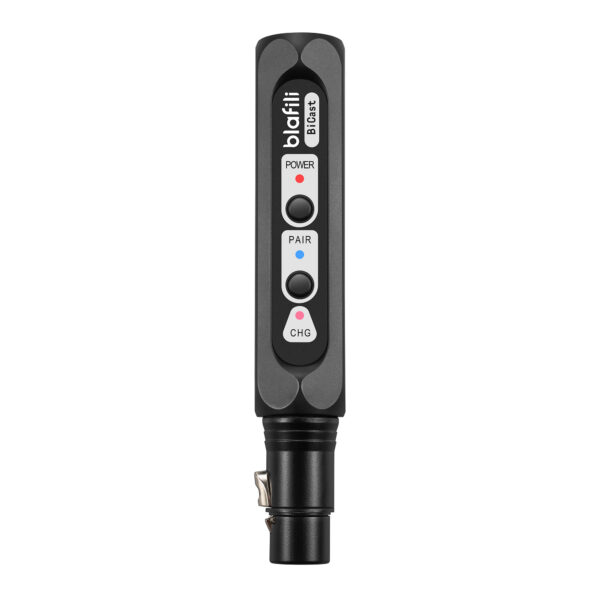
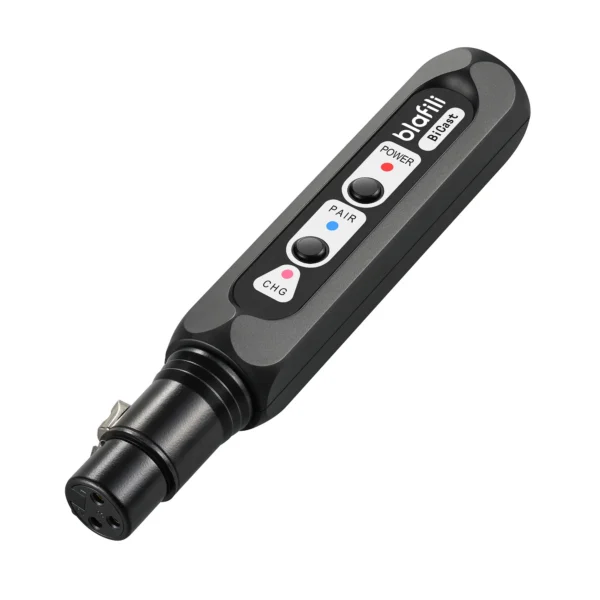
If your setup is built around wired gear, a transmitter with a broadcast-style mode (Bluetooth 5.2's own multi-receiver feature, short of Auracast certification) covers the share-with-a-group case today, and it does so with hardware you already own. That is the gap the product above fills: one source, many listeners, no pairing queue.
How a broadcast differs from pairing
Pairing creates a private, one-to-one link, with a handshake, a memory entry and exclusive access. A broadcast is public infrastructure: the stream exists whether or not anyone joins, there is no pairing step, and the fiftieth listener gets the same quality as the earliest arrival. Nothing about the stream changes when the crowd does.
That difference explains where Auracast fits naturally. A gym's wall of TVs, a university lecture hall and a house of worship all share the same shape: one source, a changing crowd, and a wide range of listening devices in the audience. A museum can push one commentary track to every visitor's own earbuds; a stadium can push the broadcast call to the concourse vendors who cannot see the field. Your phone treats joining such a stream like joining a network rather than like connecting to an accessory, and that framing is the everyday consequence of everything above: broadcasts scale, pairings do not.
FAQ
Auracast is Bluetooth broadcast audio: one transmitter sends a single stream, and unlimited nearby receivers can listen without pairing, using the Public Broadcast Profile from the LE Audio specification set.
An assistant device such as a phone, smartwatch or hearing aid remote scans for nearby broadcasts and lists them. You pick one from the list, and the audio starts; the Bluetooth SIG designed the flow to feel like joining a public Wi-Fi network.
On a Galaxy phone, open Settings, then Connections, then Bluetooth, and look for the broadcast option in the more-options menu. Availability depends on the phone model and software version, so check our Auracast receivers page for the platform detail.
Not as a broadcast receiver as of September 2026. Apple ships hearing-health features such as the Hearing Aid capability on AirPods Pro, but no Auracast option exists in iOS audio settings yet. Our iPhone codec compatibility page tracks the platform detail.
No. Auracast is a capability inside Bluetooth, introduced with version 5.2 features and the Public Broadcast Profile in the LE Audio specification set. It uses the same 2.4 GHz radio your earbuds already use.
blafili Bicast XLR Transmitter
XLR and USB-C inputs with Bluetooth 5.2 and a broadcast mode for feeding several receivers at once. Built for studios, venues and shared listening.
- Bluetooth SIG, Auracast overview: definition ("a new Bluetooth capability"), three use cases (share your audio, unmute your world, hear your best), next-generation assistive listening positioning, ABI Research statement. bluetooth.com/auracast/, accessed 2026-09-21
- Bluetooth SIG, Auracast FAQ: Bluetooth 5.2 features + Public Broadcast Profile requirement; upgradeability depends on device capabilities and supplier strategy; assistant UX (Wi-Fi-like); deployed in theatres, universities, churches, museums, stadiums; device categories (hearing aids, earbuds, headphones). bluetooth.com/auracast/faq/, accessed 2026-09-21
- Bluetooth SIG, LE Audio overview: LC3 codec and LE Audio context. bluetooth.com/learn-about-bluetooth/bluetooth-technology/le-audio/, accessed 2026-09-21
- Bluetooth SIG, Find an Auracast Product directory. bluetooth.com/auracast/find-a-product/, accessed 2026-09-21
- Bluetooth SIG, Auracast location profiles (venue examples incl. Academy of Hearing Acoustics, Sheldon Road Methodist Church). bluetooth.com/auracast/auracast-location-profiles/, accessed 2026-09-21
- Apple, AirPods Pro product page: Hearing Aid capability and hearing-health features (no Auracast mention on page). apple.com/airpods-pro/, accessed 2026-09-21
- Google, Android blog: LE Audio and Auracast support expanding (Pixel 8 onward). blog.google/products-and-platforms/platforms/android/le-audio-auracast-support/, accessed 2026-09-21
- Samsung support, share side: "Broadcast sound using Auracast" (ANS10001042) and receive side: "Listen to Auracast broadcast" (ANS10003615). samsung.com/us/support/answer/, accessed 2026-09-21
- Bluetooth SIG, Public Broadcast Profile 1.0 specification: encrypted broadcasts and Broadcast_Code decryption. bluetooth.com/specifications/, accessed 2026-09-21