
Bluetooth headphones for tv work two ways: pair them directly to a smart TV with built-in Bluetooth, or plug a Bluetooth transmitter into the TV audio output when it has none. Samsung, LG and Sony document headphone pairing in the sound settings of current models, and any TV with a headphone jack, RCA or optical output can go wireless with the right transmitter.
Bluetooth headphones for tv fall into two worlds: sets that pair with them directly in the sound settings, and sets that need a small transmitter plugged into an audio output. Both routes are documented by the TV makers themselves, and the direct route has been a standard feature on most smart TVs for years. This page walks through the pairing paths on Samsung, LG and Sony televisions, the transmitter route for TVs without Bluetooth, and the volume and lip-sync quirks that send people searching for fixes.
Do bluetooth headphones work with your TV
Start with the settings menu rather than the spec sheet. On most smart TVs the test is whether the sound menu offers a Bluetooth speaker or pairing entry; Samsung exposes it through the sound output list, LG through its [Sound Out] menu and Sony restricts it to models it lists as Bluetooth A2DP-supported. If the menu exists, your headphones pair directly and the TV treats them as a speaker system. Whether bluetooth headphones for tv work without extra hardware therefore comes down to one menu entry, and the maker documentation for all three brands puts that entry in the sound section.
One caveat comes straight from Samsung's support documentation: Bluetooth headphones made exclusively for mobile devices cannot be connected to its TVs. In practice that means headphones tuned for phone-only pairing sheets sometimes refuse a TV, so if the pairing fails on a menu that should work, the headphone side is the first suspect. The same page reminds buyers that Bluetooth devices can be blocked by walls, corners or furniture, which shapes where you can sit.
Pairing bluetooth headphones to a smart TV
The flow is nearly identical across brands once you find the menu:
| Brand | Menu path | Documented behavior |
|---|---|---|
| Samsung | Settings, then Sound, then Sound Output, then Bluetooth Speaker List | Headphones appear once pairing mode is active; volume adjusts from the TV remote |
| LG | Settings, then Sound, then Sound Out, then Bluetooth | Dual audio to two devices documented on current models |
| Sony | HOME, then Settings, then Bluetooth settings, then Add device | Only for Bluetooth A2DP-supported models; [A/V sync] available in sound settings |
Put the headphones in pairing mode first, then open the TV menu, because most TVs scan for a fixed window when you enter the Bluetooth screen. Sony's guidance adds a passcode step for some devices and notes that after pairing is completed, the device connects to the TV from the Bluetooth settings menu. Samsung describes a pop-up asking whether to play the sound when previously paired headphones power on. If the TV and headphones connected before but audio now comes from the speakers, the sound output setting has usually flipped back, so re-select the headphones in the same menu.
The per-model fine print is worth reading before a purchase rather than after. Samsung's own article opens by telling readers to make sure the TV supports the feature, and its headphone-compatibility note shows the phone-first accessory market does not guarantee TV pairing even when the menu exists. Sony prints the A2DP restriction in its pairing topic, so two visibly identical models can differ. Roku screens handle the question their own way, with headphone support tied to the remote rather than the screen, which our Roku Bluetooth headphones page documents in detail. Checking the support article for the exact model number takes two minutes and settles whether the direct route is available at all.
When the TV has no Bluetooth: add a transmitter
Older TVs, many projectors and a surprising number of mid-range sets simply lack Bluetooth audio output, and bluetooth headphones for tv still work there through the transmitter route. A bluetooth transmitter for smart tv sets and a bluetooth transmitter for old tv sets are the same device class: a small box that takes an audio output and re-broadcasts it to your headphones. The input to match is the one your TV already has.
| TV output | What you need | Notes |
|---|---|---|
| Optical (TOSLINK) | Transmitter with optical input | Common on TVs from the last 15 years; digital stereo on most sets |
| 3.5 mm headphone jack | Transmitter with 3.5 mm input | Simplest path; analog stereo |
| RCA audio out | Transmitter with RCA input | Older sets; same cable trick as turntable decks |
| HDMI only | HDMI audio extractor, then transmitter | Extra box; used when the TV exposes no other audio out |
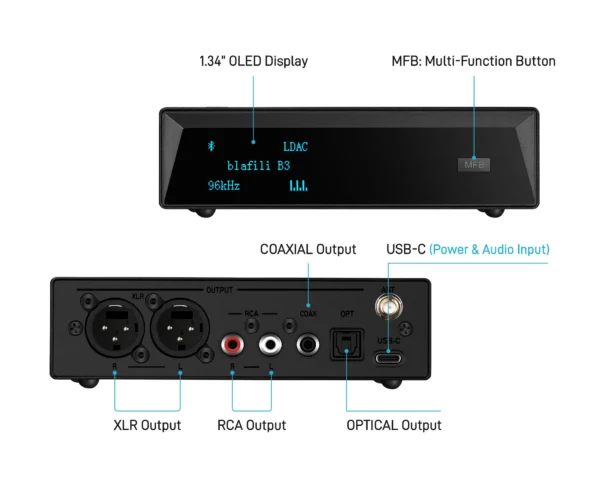
The volume question follows the output. Line-level outputs such as RCA line out and optical carry a fixed-level signal, so loudness lives on the headphones themselves, while a TV headphone jack usually follows the remote. A direct Bluetooth pairing lets the TV remote change the level. For the transmitter route, a receiver with aptX HD input handling such as the B3 keeps the digital chain intact from a TV's optical port, which is the setup this site's own hardware is built around.
Power and placement round out the transmitter decision. Small transmitters run on internal batteries or USB power, and a TV-side USB port usually provides the latter, which removes one more charger from the shelf. Placement matters more than buyers expect: the transmitter sits within Bluetooth range of wherever you watch, so a unit near the TV reaches a couch across the room, while a unit buried in a cabinet behind two metal walls fights the same physics Samsung documents for direct pairing. One transmitter serves every pair of headphones it supports, which is why the transmitter route often costs less than replacing headphones with TV-specific models.
Volume, sync and codec behavior
Lip sync is the second complaint search after pairing failures. Video frames render in milliseconds while Bluetooth audio frames take longer to arrive, and the gap shows as mouth lag. Measured numbers put standard codecs between roughly 260 and 370 ms of delay, with SBC averaging about 260 ms across true wireless earbuds in RTINGS' headphone bench and 308 ms across a four-phone measurement series, while aptX Low Latency carries an approximately 40 ms design target from Qualcomm. If your TV and headphones both expose an A/V sync setting, as Sony documents for its A2DP-capable models, nudge the offset until the dialog lands. Our Bluetooth codec latency page carries the full measurement table, and the delay troubleshooting guide walks through the fixes when picking a codec is not enough.
The sync adjustment works in both directions. When audio lags video, adding a positive offset delays the picture to match; when the TV overcorrects, you dial it back. Sony exposes this as [A/V sync] in the sound settings on the models that support it, and some headphone companion apps expose a similar slider. Set the correction while watching a scene with clear close-up dialog, not a test tone, because the goal is the reading on your own eyes. Firmware updates on either end can renegotiate the codec and shift the offset, so a setting that held for months occasionally needs one nudge after an update.
Two headphones and other limits
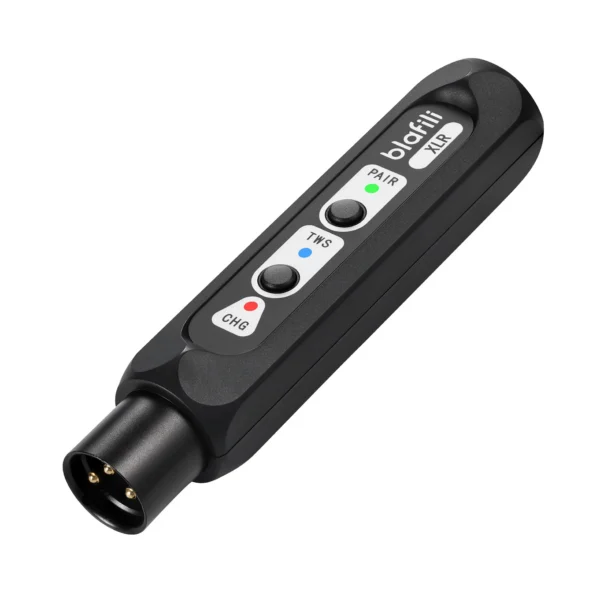
Sharing a movie with a partner needs dual-headphone support, and here the brands part ways. Samsung's documentation states only one Bluetooth device at a time can be paired to earlier TVs, while models manufactured from 2022 can connect to two Bluetooth devices. LG documents playing audio through two compatible Bluetooth headphones or earbuds at once on current webOS models in its Bluetooth device guide. Sony's help guide draws the line differently: its topic on outputting sound from both the headphones and the TV speakers states that Bluetooth audio devices such as Bluetooth headphones cannot be used, which matters if you want one wired listener and one wireless one. A dual-output transmitter sidesteps the whole question on any TV with an audio output, because the two links are managed by the transmitter rather than the television.
Troubleshooting quick hits
Most pairing complaints reduce to three checks. Distance and obstacles first: Samsung documents that Bluetooth devices can be blocked by walls, corners or furniture, so sit within a clear line of the TV before blaming the hardware. Interference second: a Bluetooth device and Wi-Fi in the same frequency band can disconnect and reconnect during use, per the same Samsung page, so a router sitting behind the TV is a suspect. Compatibility third: headphones built for mobile-only pairing cannot connect to Samsung TVs at all, and headphone manuals are the reference for model-specific behavior.
When those three check out and the connection still fails, delete the pairing on both ends and start over, because stale pairing records are the most common software-side fault. Power the headphones fully off rather than to standby, re-enter pairing mode, and re-add them from the TV menu. If the TV finds the headphones but no sound follows, look at the sound output setting rather than the Bluetooth link, since a TV can hold a pairing while routing audio to its speakers. When the connection works but audio drifts out of sync, the codec table above and the delay guide are the next stop, and when the TV has no Bluetooth menu at all, a bluetooth transmitter for old tv sets or new ones with no menu remains the path that works on any screen with an audio output.
FAQ
The three common causes are range and obstacles, since Bluetooth devices can be blocked by walls, corners or furniture; a 2.4 GHz Wi-Fi network in the same frequency band, which Samsung documents as a cause of disconnects; and headphones that are made exclusively for mobile devices, which Samsung says cannot connect to its TVs. Re-pairing from scratch and moving the headphones closer clears most cases.
Only if the TV has no Bluetooth audio output of its own. Check the sound settings for a Bluetooth speaker or pairing menu first. If the menu does not exist, a transmitter plugged into the headphone jack, RCA or optical output adds the wireless link, and optical is the usual choice on older sets.
It depends on the TV. Samsung says models manufactured from 2022 can connect to two Bluetooth devices, while its general guidance states only one Bluetooth device at a time can be paired. LG documents playing audio through two compatible Bluetooth headphones or earbuds at once on current webOS models, and Sony warns on some models that Bluetooth headphones cannot be used together with the TV speakers.
Line-level outputs such as RCA line out and optical carry a fixed level, so the headphones control their own gain, which surprises many buyers. A TV headphone jack is analog too but usually follows the remote. With a direct Bluetooth connection the TV remote does adjust volume, and Samsung notes the level can be adjusted with the TV remote control once headphones are connected.
Bluetooth headphones for tv work on any set with a headphone jack, RCA or optical audio output through a transmitter. Direct pairing without extra hardware needs a TV that supports Bluetooth audio devices, which is a per-model feature on Samsung, LG and Sony sets rather than a given.
blafili B3 Bluetooth Receiver
Optical, coax, RCA and XLR outputs with an OLED front panel, built on the QCC5125 + ES9018K2M platform. Take the audio output your TV already has and make it wireless.
- Samsung official FAQ, "How to connect Bluetooth headphones to my Samsung Smart TV": mobile-only headphones cannot connect, one device at a time, two devices from 2022 models, Wi-Fi same-frequency-band disconnects, volume via TV remote; samsung.com/ie/support/tv-audio-video/how-to-connect-bluetooth-headphones-to-my-samsung-smart-tv/, accessed 2026-09-25
- Sony TV Help Guide (print version): "Only for Bluetooth A2DP-supported models that can use Bluetooth audio devices such as headphones or speakers", [A/V sync] setting path and the dual-output restriction sentence; helpguide.sony.net/tv/caep1/v1/en/print.html, accessed 2026-09-25
- LG Help Library, "How to Connect a Bluetooth Device to Your LG TV" (dual audio) and the [Sound Out] setting path in LG TV support articles; anchors pinned at fact-check, accessed 2026-09-25
- Qualcomm aptX Low Latency codec page: approximately 40 ms end-to-end design target; aptx.com/aptx-low-latency, accessed 2026-09-25
- SoundGuys four-phone measurement series (SBC 308 / aptX 316 / LDAC 324 / AAC 369 ms averages) and RTINGS headphone bench (SBC about 260 ms), as verified for the codec latency page, accessed 2026-09-25
- blafili published product specifications (B3: optical/coax/RCA/XLR outputs, OLED, QCC5125 + ES9018K2M), per lab PROFILE caliber table, accessed 2026-09-25