
An aircraft bluetooth transmitter plugs into the seatback entertainment jack and streams that audio to your own Bluetooth headphones. You only need one when the seatback screen has no Bluetooth of its own. The FAA has allowed short-range Bluetooth accessories in airplane mode since 2013, so the whole chain is legal for the entire flight.
An aircraft bluetooth transmitter is a small box that plugs into a seatback entertainment jack and streams that audio to your own Bluetooth headphones or earbuds. You only need one when the screen in front of you has no Bluetooth of its own. The FAA has allowed short-range Bluetooth accessories in airplane mode since its 2013 policy change, which makes the whole chain legal from gate to gate. This page covers what the device does, the rules that apply, which planes have Bluetooth built in and the setup steps that avoid the common failures.
What an aircraft bluetooth transmitter does
The seatback screen on most aircraft plays movies through a wired headphone jack, usually 3.5 mm. A bluetooth adapter for planes sits between that jack and your headphones: it takes the analog audio the screen would otherwise send to airline headphones, encodes it with a Bluetooth codec and streams it to whatever earbuds you pair with it. Your phone plays no role in this chain. The transmitter and the headphones form their own private link, which is why airplane mode on your phone has nothing to do with whether the adapter works.
That is also the difference between the two halves of the Bluetooth audio world. A receiver makes a wired speaker or stereo listen to a Bluetooth source. A transmitter gives a wired audio source a Bluetooth output, and that output role is exactly what an aircraft bluetooth transmitter is built for. No amount of receiver cleverness will turn a seatback jack into a wireless signal by itself, which is why the flight job always lands on the transmitter side of the family.
Who actually benefits? Anyone whose best headphones are wireless and whose route tends toward aircraft without built-in Bluetooth. Frequent flyers on mixed fleets get the most out of one, because the same flight number can operate with a Bluetooth-equipped screen one day and a decades-old interior the next. If you fly twice a year on modern aircraft, check your airline's equipment first and save the money; if you fly monthly, the adapter pays for itself in the first trip where the alternative is a scratchy airline headset on a coiled cord.
The FAA rule in one paragraph
The current regime dates to October 2013, when the FAA determined that airlines could safely expand passenger use of portable electronics during all phases of flight, provided devices stay in airplane mode. The press release spelling out the policy states the position directly: "Devices must be used in airplane mode or with the cellular connection disabled." It then adds the sentence this whole page stands on: "You can also continue to use short-range Bluetooth accessories, like wireless keyboards."
Airplane mode kills the cellular radio, not the Bluetooth one, so you can switch Bluetooth back on after enabling airplane mode and leave it on for the flight. Voice calls over the cellular network remain off limits under FCC rules, and crew instructions override everything: the FAA guidance itself tells travelers to follow crew directions and switch a device off if asked. Airlines implement the policy per fleet, so the airline has the final word on its own aircraft.
Which planes have Bluetooth built in
An increasing share of seatback systems include Bluetooth audio, mostly on newer aircraft and retrofitted cabins. Delta and United advertise Bluetooth on part of their seatback fleets, typically the newer airframes and refreshed interiors, and American has announced Bluetooth audio connectivity for its next-generation 4K screen platform arriving with aircraft deliveries from 2028. The feature you get therefore depends on the specific plane assigned to your flight rather than the airline name on the ticket. The reliable check is the entertainment section of the airline site for your route, or the seatback system itself: if the settings menu has a Bluetooth entry, you can pair directly and skip the transmitter entirely.
Timing matters once you are aboard. Seatback systems boot in stages after boarding, and the Bluetooth menu generally appears once the entertainment system finishes its startup, so a menu that is missing at the gate may simply not be up yet. Give the system a few minutes after power-on before deciding the feature is absent. Cabin crew deal with these screens every day and can usually tell you within seconds whether your aircraft pairs wirelessly, which is often faster than any app or amenity page.
Pairing on a Bluetooth-equipped screen follows the same dance as anywhere else. Open the screen settings, choose Bluetooth, put your headphones in pairing mode and select them from the list. If no headphone search finds your earbuds, the screen probably lacks the feature, and that is the flight where an aircraft bluetooth transmitter earns its keep.
Picking and pairing a transmitter
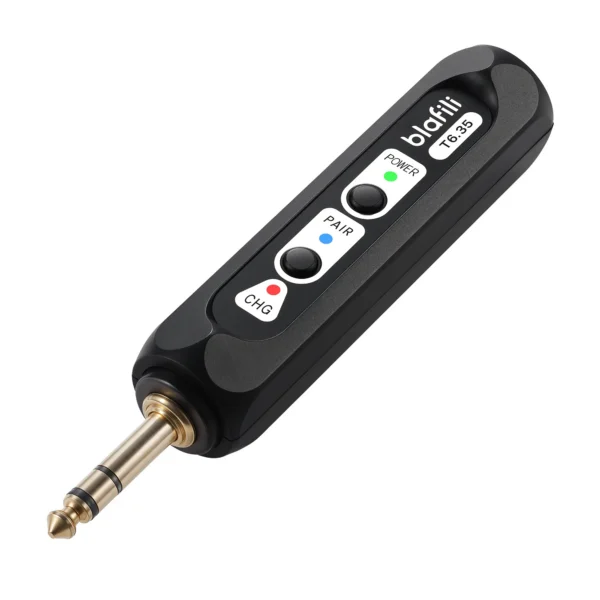
Four features separate a good aircraft bluetooth transmitter from a frustrating one:
- 3.5 mm input or an input you can reach with one cable, since the seat jack is 3.5 mm on nearly every aircraft
- Its own battery charged before boarding, because seat USB ports vary by aircraft and are not a reliable power source
- Dual-link pairing if you travel as a pair and want both headphones on one movie
- Low-latency codec support on the transmitter side, which matters for lip sync
Setup takes about a minute. Charge the transmitter, plug it into the seat jack, power it on and put your headphones in pairing mode. Most travel transmitters auto-pair to the first headphone they see; if yours has a pairing button, hold it until the light flashes. Once audio flows, the seat volume controls and the transmitter output level together set your listening level. A 1/4-inch or RCA input model such as the T6.35 works through a 3.5 mm to RCA cable, which is the same cable trick used for turntable setups. On older aircraft you may meet a double jack, two 3.5 mm sockets side by side that split stereo across both plugs; a one-cent two-to-one adapter merges them into the single plug the transmitter expects.
If the pairing succeeds but a channel is missing, seat the plug firmly: half-seated jacks are the classic cause of one-ear audio, and the double-jack sockets make a loose fit even more likely. If nothing plays at all, walk the chain in order, transmitter powered and plugged in, headphones paired to the transmitter rather than to your phone, and the seatback system actually playing. The last one catches people regularly, because a paused screen sends silence to a perfectly healthy link.
Latency and codec reality at altitude
Lip sync is where cheap adapters earn their bad reviews. The seatback screen plays video on its own display, so any audio delay shows up as mismatched mouths. The size of the problem depends on which codec an aircraft bluetooth transmitter and your headphones negotiate:
| Link | Measured audio delay | What it means on a plane |
|---|---|---|
| SBC | 308 ms average in phone tests, about 260 ms in headphone bench tests | Visible lip sync lag on dialog scenes |
| AAC | 369 ms average in the same phone tests | Common on Apple earbuds, sync still visible |
| aptX Low Latency | approximately 40 ms design target, per Qualcomm | Sits under the threshold most viewers notice |
| LDAC | 324 ms average in the same phone tests | Quality priority, sync not guaranteed |
The phone-test numbers come from SoundGuys' four-handset measurement series, with SBC cross-checked against RTINGS' headphone bench, the same sources our Bluetooth codec latency page carries. If both ends of the chain support aptX Low Latency, dialog stays comfortably in sync; if they fall back to SBC, you will notice it in close-ups. Our delay troubleshooting guide covers what to do when the fix is not as simple as picking a codec. One honest caveat: a screen that has Bluetooth built in picks its own codec, so you do not control the negotiation on those systems. Streaming two headphones from one adapter adds another wrinkle, since dual-link operation often renegotiates a lower codec tier to keep both links stable, and the sync margin narrows with it.
Practical limits worth knowing
A few last things that trip people up. A transmitter serves one seat, so each traveler who wants wireless audio needs their own unless the unit does dual-link, and an aircraft bluetooth transmitter with two-device support is the couples-and-colleagues solution. Battery life on small travel units runs several hours on a charge, which covers most movies but not a full long-haul itinerary, so top up during a layover. Some seats offer a USB port for power but no analog audio jack at all, and no jack means no input for a transmitter; the airline entertainment page is the place to check. And if the flight offers airline headphones and nothing else, wired remains the zero-latency option with no pairing step at all. When the seat jack does exist and your own earbuds are waiting, an aircraft bluetooth transmitter is the cheapest upgrade in your carry-on.
Statistical note: airline Bluetooth availability claims reflect carrier documentation reviewed in September 2026; fleets change, so confirm your aircraft before flying.
FAQ
Only if your seatback screen has no Bluetooth of its own. Delta and United include Bluetooth audio on part of their seatback fleets, and American has announced it for the 4K screens arriving with 2028 deliveries, so many travelers can pair directly. When the screen offers only a headphone jack, a transmitter in that jack is the simplest bridge to your own headphones.
Charge it before boarding, plug it into the seatback 3.5 mm jack, put your headphones in pairing mode and let the two find each other, then set your volume from the seat controls. If the transmitter does not auto-pair, hold its pairing button until the LED starts flashing and re-open your headphone pairing mode.
Switching airplane mode on disables the radios, but you can turn Bluetooth back on and leave it on. The FAA explicitly allows short-range Bluetooth accessories during the flight as long as the device stays in airplane mode with the cellular connection disabled.
On Bluetooth-equipped seatback systems, yes: put the AirPods in pairing mode with the lid open and the setup button held, then select them from the screen menu. On older screens with only a headphone jack, a transmitter bridges the gap. AirPods negotiate AAC or SBC on the seatback link, which is fine for movies; see our AirPods codec profile for the details.
blafili T6.35 Bluetooth Transmitter
A 1/4-inch TRS plus RCA input that streams to two headphones at once. With a 3.5 mm to RCA cable it takes audio straight from a seatback jack.
- FAA, "FAA to Allow Airlines to Expand Use of Personal Electronics", press release 2013-10-31: airplane-mode requirement and "You can also continue to use short-range Bluetooth accessories" verbatim; live page restructured, verified via Wayback snapshot 20210825142025, accessed 2026-09-25
- FAA, Portable Electronic Devices initiative page: "airlines can safely expand passenger use of Portable Electronic Devices (PEDs) during all phases of flight"; live page restructured, verified via Wayback snapshot 20230607071143, accessed 2026-09-25
- Airline announcements for seatback Bluetooth audio: Delta (news.delta.com, Delta Sync, 2025-01-07) and United (united.mediaroom.com, 2025-09-24) verified present-tense fleet claims; American (news.aa.com, 2026-08-18) announces Bluetooth audio connectivity for the 4K screen platform with deliveries from 2028, accessed 2026-09-25
- Qualcomm, aptX Low Latency codec page: approximately 40 ms end-to-end design target, vendor official single source, aptx.com/aptx-low-latency, accessed 2026-09-25
- SoundGuys, "Android's Bluetooth latency needs a serious overhaul": measured codec averages across four Android phones (SBC 308 / aptX 316 / LDAC 324 / AAC 369 ms), soundguys.com/android-bluetooth-latency-22732/, accessed 2026-09-25
- RTINGS latency research page: SBC lag averaging about 260 ms across its headphone bench, rtings.com/headphones/learn/research/latency, accessed 2026-09-25
- blafili published product specifications (T6.35: 1/4-inch TRS plus RCA input, simultaneous transmission to two devices), per lab PROFILE caliber table, accessed 2026-09-25
- Codec latency ranges carried from this site: third-party measurement compilation and bench data on the codec latency page, as verified for the Bluetooth audio delay guide, accessed 2026-09-25