
Most Bluetooth audio delay measures 170 to 370 ms and comes from codec buffering, not from broken gear. Re-pair the link, clear 2.4 GHz interference and use your TV's sync offset to claw back tens of milliseconds. For video-grade sync, run aptX Low Latency or aptX Adaptive on both ends.
What causes bluetooth audio delay
Bluetooth audio delay is built into how the link works. Your source encodes audio into a codec buffer, packets it, sends it over the radio, and the receiving end decodes it and plays it from its own buffer. Each stage adds milliseconds, and a noisy radio forces retransmissions that stretch the total further. This pipeline is why bluetooth audio delay shows up on every wireless link to some degree, from a basic dongle to a flagship receiver.
Measured numbers put the everyday range at 170 to 370 ms for standard codecs. RTINGS measured SBC lag averaging about 260 ms across its headphone bench, while SoundGuys' phone tests landed at 308 ms for SBC and 369 ms for AAC as averages across four Android handsets. Here is how the common codecs compare:
| Codec | Typical measured lag | Notes |
|---|---|---|
| SBC | 170-310 ms | The universal fallback. About 260 ms average in RTINGS testing, 308 ms in SoundGuys phone tests |
| AAC | about 369 ms | Android-phone average, with device-to-device swings up to 90 ms |
| aptX | about 316 ms | Average in the same SoundGuys phone tests |
| LDAC | about 320 ms | 324 ms average, with more variance at the 990 kbps setting |
| aptX Adaptive | under 80 ms | RTINGS measured its low-latency mode at a fraction of standard codecs |
| aptX Low Latency | about 40 ms | Qualcomm's end-to-end design target for video use |
The device on each end matters as much as the codec. SoundGuys ran the same Bluetooth receiver against four phones and measured a 244 ms average on a Pixel 3 XL against 484 ms on a Huawei Mate 20 Pro, close to double. When your bluetooth audio delay looks worse than a friend's on identical headphones, that device variance is usually the reason.
Perception is what turns the number into a problem. The ITU's BT.1359 study found viewers start to notice when audio trails video by around 125 ms, and a 185 ms lag already rates as unacceptable for broadcasting. That is why a music-only session hides the issue: there is nothing on screen to drift away from your ears. It is also why the same chain can feel fine for playlists and broken for films.
Quick fixes that clear most bluetooth audio delay
Before you spend money, work through this list in order. It clears the majority of real-world cases, because most excess lag comes from link conditions and stale states rather than from the codec itself. Each step takes minutes, and together they usually pull bluetooth audio delay back down to the codec's normal floor.
- Re-pair both ends from scratch
Delete the pairing on the phone and on the headphones, then pair again. This resets codec negotiation, which drifts after router changes, firmware updates and OS upgrades.
- Clear the 2.4 GHz lane
Move your Wi-Fi to the 5 GHz band, keep the headphones in line of sight of the transmitter, and keep the microwave out of the path. Interference forces retransmissions, and retransmissions show up directly as extra delay.
- Drop multipoint for a test
Headphones holding a second device (a laptop, usually) split their attention between the two. Pair one-to-one and see whether the lag tightens.
- Use the sync offset you already own
Most TVs carry an AV offset or lip-sync setting, and desktop players such as VLC expose a delay slider. Shift it until lips land on words, then write the value down.
- Update firmware on both ends
Codec bugs get patched like any other bug. A surprising number of stubborn lag reports end at a headphone firmware update.
- Test with a local file
Play a file stored on the device itself. If the lag shrinks, the delay you were chasing was network buffering upstream of the Bluetooth link, not bluetooth audio delay at all.
Fix bluetooth audio delay in the source app
Some apps let you nudge audio and video independently, which is the cheapest fix of all. Video players and smart TV platforms commonly expose an offset in 10 ms steps, and a one-time 100 to 200 ms adjustment stays saved across sessions. It does nothing for gaming, where timing shifts every second, but for films and broadcast TV it works as well as new hardware.
Bluetooth on iOS: latency is off sync
iPhones occupy their own corner of this problem. Apple licenses only SBC and AAC for Bluetooth audio, so the LDAC and aptX families stay out of the negotiation entirely. Our iPhone codec compatibility page has the per-model detail, and SoundGuys' codec overview maps the same platform split. iOS also gives you no codec switcher to force the issue. When bluetooth on iOS latency is off sync, the practical moves look like this:
- Accept the AAC path for music. Roughly 300 ms of lag is invisible when the source is a playlist and nothing on screen needs to match.
- Go wired for video. A USB-C or Lightning dongle removes the radio link from the equation, which is the one fix with a guaranteed result when an iPhone is the sender.
- Know that aptX LL receivers cannot help here. A receiver cannot use a codec the phone does not encode, so no receiver purchase fixes iPhone lag on its own.
- Use Apple's closed loop where you can. Apple's own headphones paired against an Apple TV apply sync compensation that masks part of the lag, which is one measured reason that combination feels tighter than raw codec numbers suggest.
That last point matters when you shop. On iOS, bluetooth audio delay responds to the ecosystem you build around the phone, and a receiver with codec logos on its box changes nothing about what the phone transmits.
Bluetooth headphones delay on TVs and game consoles
Video is where the problem earns its name. A TV chain adds its own processing after the audio leaves the Bluetooth link, and it plays everything against a frame clock, so codec lag lands on top of an already tight budget. Gaming headsets measure tighter than casual headphones for this reason: RTINGS' latency research put gaming headsets around 170 ms average on SBC, against roughly 260 ms for everyday headphones and earbuds.
Where bluetooth audio delay hides in TV settings
Three settings decide most of it. Game mode cuts the TV's own processing delay, which shortens the whole chain with the wireless link included. The AV offset setting shifts audio against video, and on a Bluetooth chain it buys back codec lag by delaying the other side. And the TV's audio output menu decides the codec: many sets negotiate only SBC to headphones, which caps your options before anything else loads.
Consoles are a separate story. They vary widely in what they negotiate, and some skip standard Bluetooth audio entirely, so read the console's own audio menu before buying a low-latency headphone for it. A wired controller port or a USB dongle from the headset maker usually measures faster than any integrated Bluetooth option, and it sidesteps the negotiation question completely.
Build a low latency bluetooth codec chain
When the quick fixes are not enough, the hardware chain is what moves the floor. One rule does most of the work: both ends need to speak the same low-latency codec, because the link settles on a codec that source and receiver share, and a mismatched pair falls back to SBC or AAC no matter what the box on either end promises. This single check prevents most wasted money in low-latency shopping.
The picks, in order of measured performance:
- aptX Low Latency carries a design target of about 40 ms end to end from Qualcomm, built for exactly this video-sync use.
- aptX Adaptive measures under 80 ms in its low-latency mode and is the current-generation option on newer phones and receivers.
- SBC and AAC chains stay workable for music, and a sync offset covers video at a stretch.
A receiver makes this practical for home gear. Headphones that only speak SBC plug into a receiver over a cable, and the receiver carries the low-latency codec over the air. That combination keeps bluetooth audio delay low without replacing headphones you already like.
One caveat on dual-device streaming: transmitting to two headphones at once splits the radio's bandwidth, which pushes many transmitters to renegotiate both streams down to a lower-bitrate codec. If you watch films with a partner, test the pair in two-headphone mode before settling on it.
The wider ecosystem is also moving. LE Audio, the Bluetooth SIG's next-generation stack built around the LC3 codec, is rolling into new phones, TVs and receivers, and its Auracast broadcast mode is starting to appear in venues and devices. None of this is a magic fix on day one, but per-device codec support keeps shifting, so check the codec list of each new device as you buy it.
When wired still wins
There is a floor under bluetooth audio delay. Encoding, packetizing, transmitting and decoding take a fixed number of milliseconds, and no consumer radio chain reaches what a cable does: RTINGS measured a wired USB connection at around 13 ms, with wireless USB dongle receivers landing at 22 to 42 ms. If your listening is stationary and the cable run is short, wired stays the honest answer, and it is the reference every wireless claim gets measured against.
This is also good news for older gear. A 1970s receiver such as the Marantz 2270 carries no processing delay of its own, so any lag you hear comes from the Bluetooth link you bolted onto it, and the same wiring logic applies to a deck (our turntable Bluetooth guide covers that wiring end to end). Keep the wireless link where it adds freedom, and keep the last metre wired where sync counts.
FAQ
Each phone, TV or laptop negotiates its own codec and adds its own processing overhead. In one measured comparison, average lag ranged from 244 ms to 484 ms across four Android phones on the same Bluetooth receiver. The headphone is only half of the equation.
No. Both ends of the link need to support the codec. A transmitter with aptX Low Latency pairs with standard headphones at SBC or AAC, and an iPhone does not encode aptX Low Latency at all, so the fast path only exists when source and receiver both speak it.
It shrinks below what most people notice, but it does not reach zero. A wired USB connection measures around 13 ms, and wireless USB dongle receivers measure 22 to 42 ms. The best Bluetooth chains measure under 80 ms, which sits inside the range where most viewers stop noticing a lip-sync error.
Two-device (dual link) streaming shares one radio connection. Bandwidth splits, so many transmitters renegotiate both streams down to a lower-bitrate codec, and that renegotiated mode can carry a little more delay.
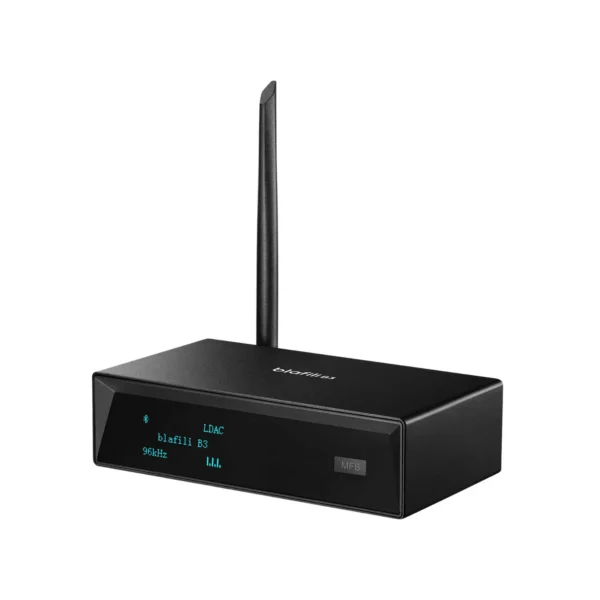
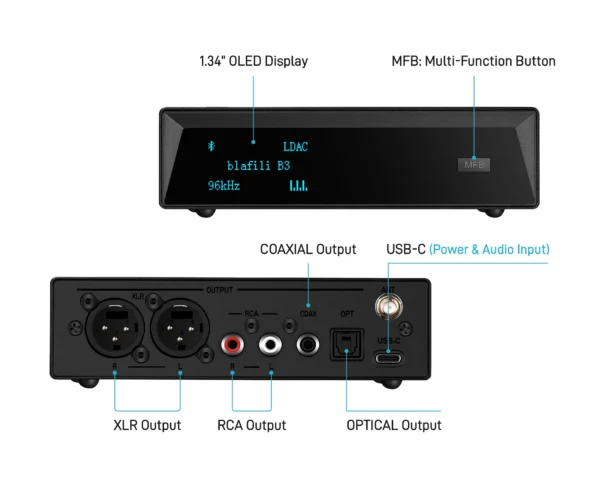
blafili B3 Bluetooth Receiver
XLR, RCA, optical and coax outputs, an OLED front panel, and the QCC5125 + ES9018K2M platform. Built to put a wired system on a wireless source.
- ITU-R BT.1359-1, "Relative timing of sound and vision for broadcasting" (1998): sync detectability and acceptability thresholds. itu.int/rec/R-REC-BT.1359/en, accessed 2026-09-21
- RTINGS, "Test Bench 1.6: Latency R&D Article": measured Bluetooth latency averages (SBC about 258 to 260 ms, aptX Adaptive LL under 80 ms, wired USB around 13 ms, wireless USB dongle receivers 22 to 42 ms). rtings.com/headphones/learn/research/latency, accessed 2026-09-21
- SoundGuys, "Android's Bluetooth latency needs a serious overhaul": measured codec averages across four Android phones (SBC 308 / aptX 316 / LDAC 324 / AAC 369 ms). soundguys.com/android-bluetooth-latency-22732/, accessed 2026-09-21
- Qualcomm aptX Low Latency product page: approximately 40 ms end-to-end design target. aptx.com/aptx-low-latency, accessed 2026-09-21
- Bluetooth SIG, LE Audio overview: LC3 and Auracast context. bluetooth.com, accessed 2026-09-21