
A bluetooth transmitter for projector audio plugs into the projector''s audio output and streams it to any Bluetooth speaker or headphones. Match the transmitter input to the output the projector offers, usually a 3.5 mm jack, and expect a small delay on standard codecs that aptX Low Latency reduces when both ends support it.
A bluetooth transmitter for projector sound solves the same problem it solves on a TV, in a room where the problem is usually worse: the picture is huge, the built-in speaker is tiny, and the audio output is one small jack on the back panel. Plug the transmitter into that jack, pair it with a Bluetooth speaker or your headphones, and the projector keeps doing what it does while the sound moves to hardware that can actually fill the room. This page covers the output options, the setup steps and the sync behavior that decides whether the result feels like a theater or a badly dubbed film.
What the transmitter does in the chain
Projectors process video beautifully and amplify audio as an afterthought. The audio output sends an analog signal that is fixed-level on many models and volume-linked on others, most commonly on a 3.5 mm jack, sometimes alongside RCA or optical on larger models. A bluetooth transmitter for projector setups taps that output and re-broadcasts it, which means the projector's own volume control and the speaker's volume control both sit in the chain. The transmitter does not touch the video path, needs no configuration on the projector itself and works with any Bluetooth speaker or headphone pair you already own. It also travels well: the same unit that serves the backyard screen serves the hotel room or the classroom, because the input is a standard analog jack rather than anything projector-specific.
That last property is the whole appeal for portable screens. Backyard movie nights, garage gyms and campervan walls all share the same pattern: the projector travels, the sound hardware varies, and a transmitter adapts to whatever speakers are on hand instead of locking you into a bundled soundbar. The category name is longer than the hardware, and a bluetooth transmitter for projector duty is usually the same pocket-sized unit travelers carry for airplane seats, which is why one device tends to end up serving several screens.
Matching the audio output
| Projector output | Transmitter input to match | Notes |
|---|---|---|
| 3.5 mm audio out | 3.5 mm in, or RCA in with a 3.5 mm to RCA cable | The common case on projectors of every price tier |
| RCA audio out | RCA in | Larger and older models; red and white pair carries stereo |
| Optical out | Optical in | Higher-end home units; digital stereo on most projectors |
| HDMI only, no audio out | HDMI audio extractor, then transmitter | Extra box between source and projector; use when no other output exists |
Cables are cheap and worth buying with the transmitter, and labeling them for the bag beats guessing in the dark before a show. The right cable also protects the projector jack from the sideways leverage of heavy adapter stacks, which is a quiet killer of portable projectors. A 3.5 mm to RCA pair covers the T6.35's input, the same adapter logic used on turntables and airplane seats, and a spare 3.5 mm to 3.5 mm cable handles transmitters with a native mini jack. If the projector exposes no analog output at all, an HDMI audio extractor strips the sound from the HDMI stream between the source and the projector and hands it to the transmitter separately.
Setup in four steps
Setup follows the same shape as every other transmitter installation. Power the transmitter and let it boot. Run the cable from the projector's audio out to the transmitter input. Put the speaker or headphones in pairing mode and let the two find each other, keeping them a meter apart for the first handshake. Then play something with dialog and set levels, because on models with a volume-linked output the projector volume steps act as a preamp rather than a power switch, while fixed-level outputs ignore the remote and take their level from the speaker itself.
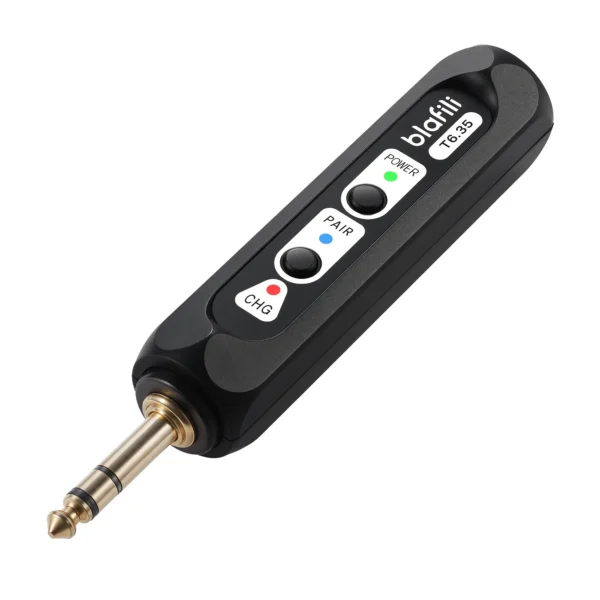
Power options travel with the use case. A wall adapter works for a fixed media room, a USB power bank suits the backyard, and a campervan or portable screen setup can run the transmitter off the same battery as the projector, provided the battery's USB output holds a stable 5 volts. Transmitters with internal batteries trade runtime for tidiness, and a charge-top before the movie beats a black screen at the good part.
One placement note saves an evening of debugging. Bluetooth range shrinks behind metal and dense plastic, and some projector bodies are exactly that, so a transmitter clipped to the projector's back panel can underperform the same unit sitting on the table beside it. If pairing holds but audio stutters at distance, move the transmitter out of the projector's shadow before replacing anything.
Speakers and headphones as receiving ends
The receiving end decides how big the upgrade feels. A single Bluetooth speaker on a picnic table covers a small backyard screen well enough, and the codec pair between transmitter and speaker decides whether dialog arrives on time. Powered stereo speakers give the biggest jump in a fixed room, because the projector keeps its travel role while the audio grows into something closer to a living room system. Headphones turn the same chain into a late-night setup, which matters in apartments and campervans where walls are thin.
Dual-link is the backyard version of a shared sofa. A bluetooth transmitter for projector sound with two-device support feeds a speaker on each side of the screen, and the stereo image actually lands between them for viewers sitting center. The same headroom caveat applies as everywhere else: two active links share the radio, so the negotiated codec often steps down a tier, and both speakers should support the same codec set so neither side drops to SBC alone while the other runs aptX. For the quality tier on the receiving end, aptX HD on capable speakers keeps music-heavy content clean, per Qualcomm's codec documentation.
Sync and codec behavior
A projector makes audio delay visible in a way music never does, because lips and soundtracks sit side by side on a two-meter image. Measured delay for standard codecs runs in the hundreds of milliseconds, with SBC averaging about 260 ms across true wireless earbuds in RTINGS' bench and 308 ms in SoundGuys' four-phone series, and AAC averaging 369 ms in the same series. Qualcomm's aptX Low Latency carries an approximately 40 ms design target for exactly this scenario, and the adaptive tier sits near 80 ms for low system latency per Qualcomm's documentation. Both ends of the link have to support the codec for those numbers to apply, which is the same negotiation rule covered on our codec latency page.
When delay still shows despite a capable codec pair, the projector itself may add processing. Some models run picture modes that buffer frames for motion smoothing, and the sound path does not know about it, so dialog drifts by exactly the amount the video pipeline added. The fix mirrors our TV delay guide: pick a game or low-latency picture mode, or accept the offset and correct it at the soundbar if it offers a sync control. Test the correction with a scene that has close-up dialog rather than a test pattern, because your eyes are the instrument that matters here.
Common failures and quick fixes
Three failures account for most support requests on this setup. No sound at all: walk the chain, projector actually playing, cable seated at both ends, transmitter powered, speaker paired and its own volume up, because a fixed-level output sends silence straight through a healthy link. Stuttering at distance: move the transmitter out of the projector's metal shadow and away from the Wi-Fi router, since the 2.4 GHz band carries both. Echo: the projector's built-in speaker is still on while the wireless pair runs, so mute the internal speaker in the projector menu rather than turning the whole output down.
One more quirk belongs on the list. A projector that pauses for a menu or a screensaver sends silence but keeps the Bluetooth link alive, and some speakers respond to a long silence with their own power-saving sleep, which then needs a wake-up tap. If the audio returns only after touching the speaker, the speaker's auto-sleep is the culprit, and its app or manual will name the setting.
When the projector has Bluetooth built in
Newer portable projectors increasingly pair with speakers directly, and the built-in route removes a box from the bag. The trade-offs match the TV world: the codec choice is whatever the projector maker fitted, often just the standard SBC, and support varies by model line rather than by price bracket, so the manual is the honest source for what a given unit pairs with. Built-in transmitters also tend to serve a single speaker at a time, which pushes group viewing back toward a dual-link external unit. If the projector lists Bluetooth in its menu, pair there first and keep the transmitter as the fallback for codecs it cannot reach. Our transmitter for headphones guide explains the negotiation mechanics in detail, because they work identically whether the source is a projector, a TV or a treadmill.
FAQ
Through the projector's audio output when the projector has no Bluetooth of its own: run a cable from the 3.5 mm audio out to a transmitter, pair the speaker with the transmitter and set the projector volume. If the projector menu already lists Bluetooth speakers, pair there directly and skip the extra hardware. Either way, mute the built-in speaker so the two outputs do not echo each other.
Bluetooth audio arrives after the picture by design on standard codecs, and measured delay runs in the hundreds of milliseconds for SBC and AAC. aptX Low Latency shortens the link to approximately 40 ms when both ends support it, which most viewers stop noticing on dialog.
Most do, commonly a 3.5 mm output, and some add optical or RCA. Portable models vary the most, so check the spec sheet for "audio out" before counting on the jack. A projector with HDMI but no audio output can still feed a transmitter through an HDMI audio extractor.
With a dual-link transmitter, yes, and that is the reliable way to cover two sides of a backyard screen. Two speakers share the radio time, so the pair often negotiates a lower codec tier, and both speakers should support the same codec for consistent sound. Place one speaker behind the screen line on each side, because distance between the two matters less than keeping both within the transmitter's clear line of sight.
blafili T6.35 Bluetooth Transmitter
A 1/4-inch TRS plus RCA input that streams to two speakers at once. With a 3.5 mm to RCA cable it takes audio straight from a projector's audio out.
- Qualcomm aptX Low Latency codec page: approximately 40 ms end-to-end design target; aptx.com/aptx-low-latency, accessed 2026-09-25
- Qualcomm aptX Adaptive codec page: "Low system latency approx. 80ms" verbatim; aptx.com/aptx-adaptive, accessed 2026-09-25
- SoundGuys four-phone measurement series (SBC 308 / aptX 316 / LDAC 324 / AAC 369 ms averages) and RTINGS headphone bench (SBC about 260 ms across true wireless earbuds), as verified for the codec latency page, accessed 2026-09-25
- Epson official support documentation, "You cannot connect multiple Bluetooth audio devices to the projector at the same time" (single-device limit, verbatim, epson.com support), and Anker soundcore support documentation, "How to Connect an External Speaker to Your Projector (Android TV System)" (Nebula Android TV models connect to Bluetooth speakers directly, built-in Bluetooth audio out, service.soundcore.com/article-description/How-to-Connect-an-External-Speaker-to-Your-Projector-Android-TV-System); audio output behavior varies by model, accessed 2026-09-25
- blafili published product specifications (T6.35: 1/4-inch TRS plus RCA input, simultaneous transmission to two devices), per lab PROFILE caliber table, accessed 2026-09-25