
A bluetooth transmitter for headphones gives any device with an audio output a wireless link to your earbuds: plug it into the jack, pair the headphones once and the two form their own link. The codec you get is the best one both ends support, and a transmitter cannot add a codec your headphones or source do not already have.
A bluetooth transmitter for headphones solves one specific problem: a device that produces great audio but has no Bluetooth output, or a headphone jack that deserves better than wired cables in the wrong place. Plug the transmitter into that output, pair your earbuds once, and the two devices form their own private link that has nothing to do with your phone. The whole setup is a small purchase that works with the headphones you already like. This page covers where the setup earns its keep, the pairing steps that avoid the usual dead ends, what codec you actually get, and one honest answer about iPhones.
Where a bluetooth transmitter for headphones fits
The use cases cluster around sources that predate wireless audio or lock you into a seat. A TV with no Bluetooth menu, an aircraft seatback screen, a gym treadmill with a 3.5 mm jack, a turntable, a mixer, a desktop PC without a wireless card, a projector: all of them speak analog or digital audio out, and a bluetooth transmitter for headphones turns that output into a signal your earbuds already know how to receive. We keep dedicated guides for the three biggest scenarios, TV setups, airplane seats and turntable decks, and the pairing logic on this page applies to all of them.
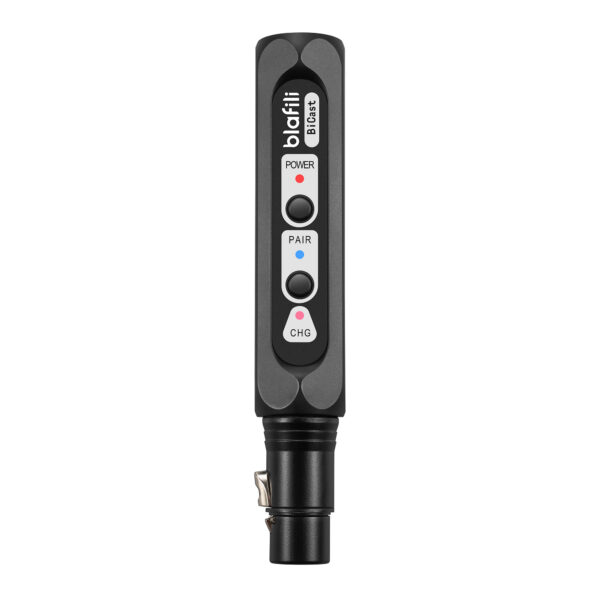
The word bluetooth transmitter for earbuds shows up in the same searches, and the hardware is identical. Transmitters do not care whether the receiving end is an over-ear headphone, a true wireless earbud or a hearing-aid streamer, as long as the receiver speaks standard Bluetooth audio. The receiving side sets the codec ceiling together with the transmitter, which is the next section.
One naming trap sits in wait at the store shelf. A bluetooth receiver looks similar and solves the opposite problem, giving wired speakers a way to listen to a Bluetooth source, so a buyer who grabs the wrong little box ends up with a gadget that plugs into the TV's inputs rather than its outputs. The direction check is quick: outputs feed a transmitter, inputs feed a receiver. Transmitters also split by connection type, analog 3.5 mm and RCA on travel models, optical and coax on home units, and USB on some PC-oriented designs, so the input list matters more than any marketing line about range or battery.
Pairing your headphones to a transmitter
Pairing is a two-sided dance and the order matters less than patience. Start both ends fresh: power the transmitter, put it in pairing mode, then put your headphones in pairing mode and keep them within a meter for the first connection. Most transmitters grab the first pairable headphone they see; a few need you to pick from a menu or press a confirm button. Once the link is live, move to your normal listening distance and confirm the audio holds.
AirPods follow the Apple setup flow for non-Apple devices: open the lid and enter pairing mode, holding the setup button on older models or double-tapping the front of the case on AirPods 4 and AirPods Pro 3 until the light flashes. The transmitter sees them as just another Bluetooth audio device. The same logic applies to most true wireless earbuds with a case button or a long-press on the touch surface. If the transmitter shows a steady light and nothing pairs, its memory is probably full: clear the stored pairing, usually by holding the pairing button longer, and try again. If one ear drops audio while the other plays, reseat both earbuds in the case, because half-seated buds re-enter pairing mode on their own.
A few habits keep the link stable for months after that first handshake. Give the pairing a name you recognize if the transmitter supports it, because a pocket full of anonymous Bluetooth entries ends in pairing to the neighbor's earbuds. Update the transmitter firmware if it offers updates, since codec fixes arrive that way. And when you switch the transmitter between sources, from the TV to the plane seat, expect to re-pair if the new source plugs in cleanly but stays silent, because some units hold the old link rather than hunting for a new one.
What codec you actually get
A Bluetooth link runs on one codec at a time, chosen as the best option both ends support. The transmitter advertises its codec set, the headphones advertise theirs, and the pair settles on the overlap. That mechanism has two consequences worth internalizing. First, the quality ceiling is the weaker end: aptX HD advertised on the box means little if your earbuds only speak AAC and SBC. Second, the link type drives latency, which matters when the source shows video. Measured numbers put SBC at about 260 ms across true wireless earbuds in RTINGS' bench and 308 ms in SoundGuys' four-phone series, while Qualcomm's aptX Low Latency carries an approximately 40 ms design target.
| Codec pair | What you get | Best for |
|---|---|---|
| SBC both ends | Works everywhere, long delay | Music, audiobooks |
| AAC both ends | Good quality for Apple earbuds | Music, streaming |
| aptX Low Latency both ends | Approximately 40 ms design target | Video, gaming, treadmill TV |
| aptX HD or LDAC both ends | High bitrate, delay not the priority | Music at a desk |
The full measurement table lives on our Bluetooth codec latency page, which also covers what to try when sync drifts anyway.
Reading the negotiation in practice takes one habit: listen for the fallback. A transmitter that advertises aptX Low Latency with headphones that answer in SBC will play audio happily and delay visibly, and nothing on the box tells you which tier engaged. Some transmitters signal the active codec with an LED color, which is worth checking in the manual before buying rather than after. The general rule holds across the table: every codec in a pair has to appear on both ends, so the shopping list is really two lists, one for the transmitter and one for the headphones you already own.
The iPhone question, answered honestly
Searches for a bluetooth transmitter for iphone usually carry one of two assumptions, and both deserve a straight answer. If the goal is better codecs from the iPhone's own Bluetooth radio, a transmitter cannot change that: the phone's radio encodes AAC and SBC for Bluetooth audio, as our iPhone LDAC profile documents from the device specifications, so the negotiation tops out there. A dongle-style transmitter plugged into the phone's analog output plays by different rules, because the transmitter itself becomes the source and encodes with its own set, which is the same architecture that puts aptX on game consoles through USB dongles. If the goal is to send iPhone audio to headphones through a wire, that is the reverse direction, a receiver job, and the transmitter category is the wrong shelf.
What an iPhone does gain from a transmitter is convenience in odd places: a plane seat with a transmitter in the jack pairs with AirPods like any other source, and a treadmill or gym machine behaves the same. In both cases the iPhone sits the scenario out entirely, because the seat or the machine is the source and the phone stays in your pocket in airplane mode. Our airplane guide covers the seat setup step by step, and the codec you get there is the pair the transmitter and AirPods negotiate, typically AAC or SBC.
Dual-link and sharing
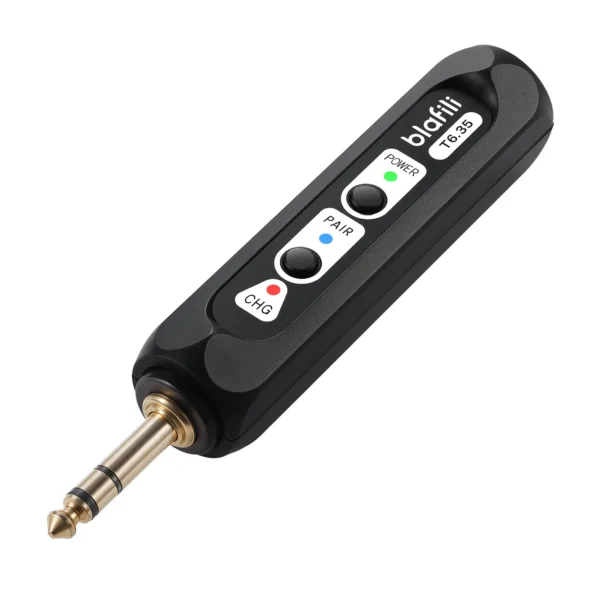
Two listeners, one source: that is the dual-link promise, and it works exactly as advertised on transmitters that support it. The T6.35, this site's own dual-output transmitter, streams to two devices at once over its 1/4-inch TRS and RCA input. The honest caveat is headroom. Two active links share the same radio time, and pairs commonly renegotiate a lower codec tier to keep both stable, so shared listening usually costs a little quality. For movies and music at conversational volumes that trade is invisible; for critical listening, wired splits remain the reference. Sync also deserves a note in shared listening: two links mean two potentially different codec tiers, so one listener can hear tight dialog while the other hears lag, a quirk that surprises couples who assume both ends behave identically.
Buying checklist
Match these five points to your source and you will not need a return window. Input first: the transmitter input has to match the output you are feeding it, whether that is 3.5 mm, RCA, 1/4-inch TRS or optical. Codec support second, on both ends, because the pair negotiates the overlap. Latency third if video is involved, where aptX Low Latency on both ends is the design goal. Battery fourth, sized to your session, with USB power as the backup for permanent installs. Dual-link fifth if two listeners are in the picture, and keep the cable that matches the first check in the bag with it. A bluetooth transmitter for headphones that clears those five checks works with the gear you already own, and the pairing section above is the only skill it demands. Prices cluster low enough that the return window rarely gets exercised, which is another way of saying the category has matured: the failures we see in search data are pairing and codec mismatches, not broken hardware, and both are preventable with the two lists in the codec section.
FAQ
Yes. AirPods pair with a transmitter much the same way they pair with a phone: open the lid, enter pairing mode with the setup button on older models or a double-tap on the case front for AirPods 4 and AirPods Pro 3, and let the transmitter find them. Any standard Bluetooth headphone or earbud can pair with a transmitter that broadcasts a discoverable signal, whether the headphones cost $30 or $300.
Power the transmitter and put it in pairing mode, then put your headphones in pairing mode and keep both devices within a meter for the first connection. Most transmitters auto-pair to the first headphone they see. If two devices are already connected, clear the old pairing first, because a full memory is the most common reason a new pair will not join.
It depends on which chain carries the audio. The iPhone's own Bluetooth radio tops out at AAC and SBC, so wireless audio straight from the phone never reaches aptX or LDAC. A dongle-style transmitter fed from the phone's analog output is a different architecture: the transmitter is the source there and encodes with its own codec set, so aptX works when transmitter and headphones support it, at the cost of one extra conversion. See our iPhone LDAC profile for the full picture.
Transmitters with dual-link support can, and that is the standard setup for couples on a plane or two listeners at a treadmill. The trade-off is codec headroom: with two links active, the pair often renegotiates a lower tier to keep both stable, so expect the quality floor rather than the ceiling.
Any standard Bluetooth audio headphone or earbud, yes, because the transmitter presents itself as an ordinary Bluetooth audio source. The exceptions are devices locked to a proprietary dock or phones-only pairing flows, which are rare in audio gear and common sense to check before a trip.
blafili T6.35 Bluetooth Transmitter
A 1/4-inch TRS plus RCA input that streams to two headphones at once, so one treadmill, one plane seat or one TV covers two listeners. Plug in once and pair your earbuds like any other source.
- Apple support, "Pair AirPods with a non-Apple device" (support.apple.com/guide/airpods/pair-airpods-with-a-non-apple-device-dev499c9718b/web): pairing-mode steps, older models use the setup button and AirPods 4 and later use the case front, accessed 2026-09-25
- Apple iPhone codec behavior: iPhone encodes AAC and SBC for Bluetooth audio playback, per the device specs and sources verified on this site's iPhone LDAC page, accessed 2026-09-25
- Qualcomm aptX family codec pages (aptX HD, aptX Low Latency approximately 40 ms): codec capability and latency design targets, aptx.com, accessed 2026-09-25
- SoundGuys four-phone measurement series (SBC 308 / aptX 316 / LDAC 324 / AAC 369 ms averages) and RTINGS headphone bench (SBC about 260 ms across true wireless earbuds), as verified for the codec latency page, accessed 2026-09-25
- blafili published product specifications (T6.35: 1/4-inch TRS plus RCA input, simultaneous transmission to two devices), per lab PROFILE caliber table, accessed 2026-09-25