
Samsung TV Bluetooth is a per-model feature, and Samsung publishes the test: open Settings, go to Sound, then Sound Output, and if a Bluetooth Speaker List appears, the TV supports Bluetooth audio. Newer sets go further and pair multiple Bluetooth audio devices with sound to both at the same time. Sets without the list are not stuck: a transmitter plugged into the headphone jack, RCA or optical output adds the wireless link to any Samsung TV. Menus and fixes below, with Samsung's own pages as sources.
Menus on this page were checked October 2026 against Samsung's own support articles, US and regional. Model years shift menu names; the Sound Output test holds.
Does your Samsung TV have Bluetooth at all?
Samsung ships Bluetooth audio on many sets and skips it on others, and the maker's own compatibility check takes ten seconds. Open Settings, head to Sound, then Sound Output: if a Bluetooth Speaker List option appears in that menu, the TV supports Bluetooth audio devices; if the menu only lists the wired outputs, it does not (ANS10006960). The check beats guessing from the model name, because the feature moves between lines and years rather than following price alone.
The Sound Output menu is worth reading in full while you are there, because it doubles as the TV's audio control panel. On a supporting set it lists the internal speakers, the wired outputs and the Bluetooth options together; on a set without Bluetooth it stops at the wired choices. That difference, one menu entry, is the whole compatibility question, and it is cheaper than any spec sheet. A spec sheet rarely answers it anyway, because Bluetooth audio comes and goes between model lines and years rather than tracking the price of the set, which is exactly why Samsung routes the question through a menu instead of a model chart.
One habit worth keeping: run the check before shopping for headphones for the set. The two-minute menu look decides whether the rest of this page is about pairing menus or about plugging in a transmitter, and it has decided wrong purchases the other way too, buyers assuming an old set cannot pair when its Speaker List was hiding in plain sight.
The check also sets expectations for what pairs. Samsung's article titles the menu Bluetooth Speaker List and it serves generic Bluetooth audio devices: headphones first, Bluetooth speakers alongside them, and receivers that hand the sound on to wired gear. What it does not do is change what the TV sends, the list carries the TV's own sound to whatever device pairs, so the feature is about where the audio lands, not about extra channels or second soundtracks. One stream, one or two destinations, selected from the Sound Output menu.
Pairing headphones and speakers
On supporting sets, pairing lives in that same Bluetooth Speaker List. Put the headphones into pairing mode, open the list, and select them; the TV switches its sound output to the newly paired device. Samsung's Australian guide groups the paths by model year, and the route has lengthened as the menu tree grew: sets from 2023 through 2026 run Settings, All Settings, Sound, Sound Output, the 2022 models follow the same long route, and the shorter Settings, Sound menu belongs to the 2018 to 2021 years (Samsung AU guide).
Speakers pair through the same list, and the TV remembers devices between sessions, so the second connection is a menu visit rather than a pairing ritual. Two small behaviors make the first pairing go smoother. Keep the headphones within a metre of the set while the list is open, because discovery is the most range-sensitive step in the whole chain; and if a device has paired before and gone quiet, delete it from the list and pair fresh rather than expecting the old entry to wake up.
The model-year difference is worth a sentence of sympathy for older sets. The 2023 to 2026 route runs through the full menu tree, Settings, All Settings, Sound, Sound Output, and the 2022 sets follow it; the shorter Settings, Sound path belongs to the 2018 to 2021 years; and the earliest smart sets name the menu differently again, which is why Samsung's regional guides list the years one by one rather than printing a single route. The destination is the same on every single one of them: the Bluetooth Speaker List, and the pairing that follows it, whatever the menu was called on the way there.
The volume behavior follows the connection: Samsung notes the level can be adjusted with the TV remote once headphones are connected, which is not true of every TV maker. Some brands leave headphone volume to the headphones themselves; on a Samsung set, the remote stays in charge, which is the behavior most listeners expect.
Two listeners at once
The dual-listener question has a two-part answer. Samsung's US pairing article states that newer Samsung TVs can pair and connect multiple Bluetooth audio devices and have the sound output to both at the same time (ANS10006968). Regional pages put a date on the simpler version: smart TVs from 2022 onward can connect to two Bluetooth devices at once (Samsung Levant).
Two practical readings. If the set carries the feature, two people can watch with two headphone pairs and no extra hardware, and the sound output menu is where both devices get selected. If it does not, or the second listener wants a different volume, a transmitter that serves two receivers at once from the TV's audio output is the add-on path, and the TV audio guide covers what that chain looks like.
It is worth setting expectations for the shared-listening case: both listeners hear the same stream, in sync with each other, at whatever volume each headphone carries. The feature is sharing, not separate channels; two people watching different sources needs a second source, not a second pairing.
No Bluetooth on the set: the transmitter path
A Samsung TV without the Speaker List still has audio outputs, and a Bluetooth transmitter turns any of them into a wireless source. The headphone jack, RCA and optical outputs all work; optical is the usual choice on sets where the jack panel is busy, and a transmitter fed from line level leaves the TV's own volume alone. The transmitter guide walks the pairing side, and the same hardware serves any TV brand, not just Samsung.
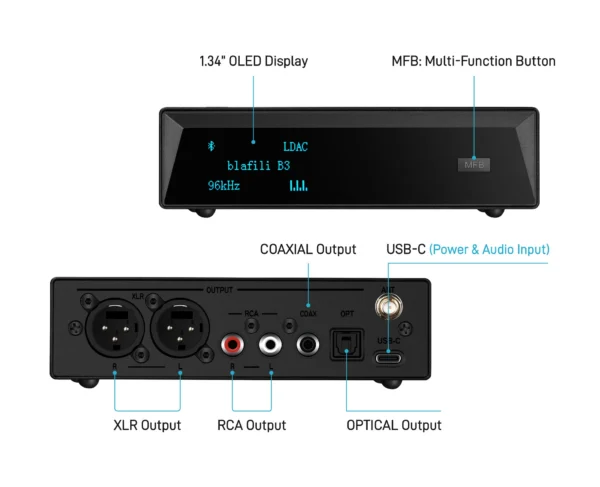
The output choice has one practical consequence worth knowing before you buy. Line-level outputs such as RCA line out and optical carry a fixed level, so the headphones control their own gain; a headphone jack usually follows the TV remote instead. Neither is wrong, but knowing which behaviour you prefer picks the socket for you.
For two listeners on a set without dual output, a dual-link transmitter feeds two headphones from the one output, which is the feature to check on the product page before buying.
When pairing fails
Samsung's own headphone FAQ lists the TV-side causes: a 2.4 GHz Wi-Fi network running in the same frequency band, which causes disconnects; and headphones made exclusively for mobile devices, which cannot connect to its TVs at all (Samsung IE FAQ). The remedies are direct, and they work best in order:
- Delete and re-pair. Remove the quiet device from the Speaker List, restart the headphones, and pair fresh with both ends close together.
- Clear the air. Move the router off the 2.4 GHz band for the test, and keep the headphones within a metre of the set while the list is open.
- Check the device class. Headphones sold exclusively for mobile devices cannot connect to Samsung TVs by design; another pair, or a transmitter chain, is the answer rather than another re-pair.
The full drop-and-stutter checklist, multipoint conflicts included, lives in our cutting out guide.
Lip sync: the Bluetooth tax on TV sound
Bluetooth audio takes time: the source encodes, the radio carries, the headphones decode, and the chain adds its delay to every soundtrack. For music that latency is invisible; for dialogue it shows as lips moving before the words arrive. The size of the tax belongs to the codec chain, not to Samsung: on published benches the standard music codecs measure in the hundreds of milliseconds, while the low-latency forms target far less, and those numbers are compiled, with sources, on our latency bench.
If a Samsung set offers a lip sync or audio delay adjustment, that setting offsets the chain's latency at the TV side, and small values often clean up dialogue alignment. Measuring your own chain before adjusting anything is the honest order of operations, and the latency tester on this site does it in the browser in under a minute.
One more expectation to set for the transmitter path, because it comes up in every living room: a transmitter chain adds its own latency on top of whatever the headphones carry, and the same lip-sync arithmetic applies. Listeners who notice the effect on dialogue usually land on the same two-part fix, headphones and transmitter that both support a low-latency codec on the one hand, and the TV's delay setting trimmed to match on the other. The numbers to compare live on the latency bench, and the delay guide collects the fixes that work across all of them.
FAQ
No, it is a per-model feature rather than a brand-wide one. Samsung's own support article gives the check: open Settings, go to Sound, then Sound Output, and a Bluetooth Speaker List entry means the TV supports Bluetooth audio devices. Menu names shift slightly by model year, but the Sound Output test holds across the current support pages.
Through the Sound Output menu on sets that support it: open the Bluetooth Speaker List, put the headphones in pairing mode and select them. Samsung's Australian guide groups the paths by model year: sets from 2023 through 2026 and the 2022 models run Settings, All Settings, Sound, Sound Output, while the shorter Settings, Sound menu belongs to the 2018 to 2021 years.
On newer sets, yes. Samsung's US pairing article states that newer Samsung TVs can pair and connect multiple Bluetooth audio devices and output sound to both at the same time, and its regional pages date the two-device capability to smart TVs from 2022 onward. On sets without the feature, a dual-link transmitter feeding two receivers is the add-on route.
Add the link outside the TV. A Bluetooth transmitter plugged into the headphone jack, RCA or optical output pairs with the headphones directly, and optical is the usual choice on sets that keep the jack panel busy. The TV treats nothing differently; the transmitter is the source the headphones see.
They can, because Bluetooth audio takes time to encode and decode, and lip sync is the visible symptom. The size of the delay belongs to the codec chain rather than to Samsung: standard music codecs measure in the hundreds of milliseconds on published benches, while low-latency forms target far less. Our latency guide and in-browser tester cover the numbers.
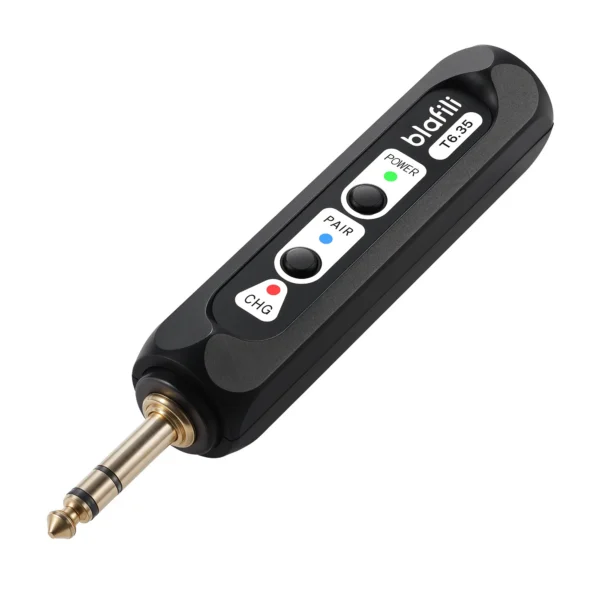
blafili T6.35 Bluetooth Transmitter
Quarter-inch TRS and RCA inputs with dual-device simultaneous transmitting: feed it from the TV audio output and two listeners can each wear their own headphones.
- Samsung US support, "Connect a Bluetooth device to your Samsung TV" (ANS10006960): check Settings, Sound, Sound Output; a Bluetooth Speaker List entry means the TV supports Bluetooth. samsung.com/us/support/answer/ANS10006960, accessed 2026-10-01
- Samsung US support, "Pair Bluetooth headphones to your Samsung TV" (ANS10006968): newer Samsung TVs can pair and connect multiple Bluetooth audio devices with sound output to both at the same time. samsung.com/us/support/answer/ANS10006968, accessed 2026-10-01
- Samsung Australia support, "Connect Bluetooth Headphones to your Samsung TV": pairing paths by model year, including Settings, All Settings, Sound, Sound Output for 2023-2026 TVs and the shorter Settings, Sound menu on 2018-2021 sets. samsung.com/au/support/tv-audio-video/connect-bluetooth-audio-device/, accessed 2026-10-01
- Samsung Levant support, "How to connect Bluetooth headphones to my Samsung Smart TV": Samsung Smart TVs from 2022 onward can connect to two Bluetooth devices at once. samsung.com/levant/support/tv-audio-video/how-to-connect-bluetooth-headphones-to-my-samsung-smart-tv, accessed 2026-10-01
- Samsung official FAQ, "How to connect Bluetooth headphones to my Samsung Smart TV" (IE): 2.4 GHz Wi-Fi in the same frequency band as a disconnect cause; mobile-only headphones cannot connect; volume via TV remote. samsung.com/ie/support/tv-audio-video/how-to-connect-bluetooth-headphones-to-my-samsung-smart-tv/, accessed 2026-09-25 (verified on our TV audio guide)
- RTINGS latency research, Test Bench 1.6, and SoundGuys four-phone test: measured codec latencies cited on our latency bench, accessed 2026-09-22