
To connect a DJ mixer to Bluetooth, send its booth, record or master output into a Bluetooth transmitter for wireless speakers, or plug a Bluetooth receiver into a spare line input for phone requests. Keep your headphone cueing wired, because wireless delay makes beatmatching by ear unreliable.
Connecting a DJ mixer to Bluetooth gear is a two-direction question, and the direction decides everything about latency and quality. Outbound, the mixer's booth or record output feeds a Bluetooth transmitter so wireless speakers or headphones can hear the mix. Inbound, a Bluetooth receiver feeds a spare line input so a phone can hand tracks to the mixer like any other source. Both directions are ordinary line-level audio once the conversion boxes are in place, and this page walks the wiring, the level setting and the one place where wireless genuinely does not belong: the cue path.
The outbound direction: mixer to wireless speakers
The output side is the common case, and it exists because rented venues and backyard parties increasingly hold wireless speakers rather than powered mains. Almost every mixer carries outputs you can borrow without touching the master feed: a booth output meant for monitor speakers, a record output that predates USB recording, or a second master. Any of those carries a line-level copy of the mix, and a bluetooth transmitter for headphones and speakers turns the chosen output into a wireless broadcast. The mixer fader, the transmitter and the speaker gain each control level in series, so set the mixer to its normal operating range first and trim the rest until the speaker sits clean.
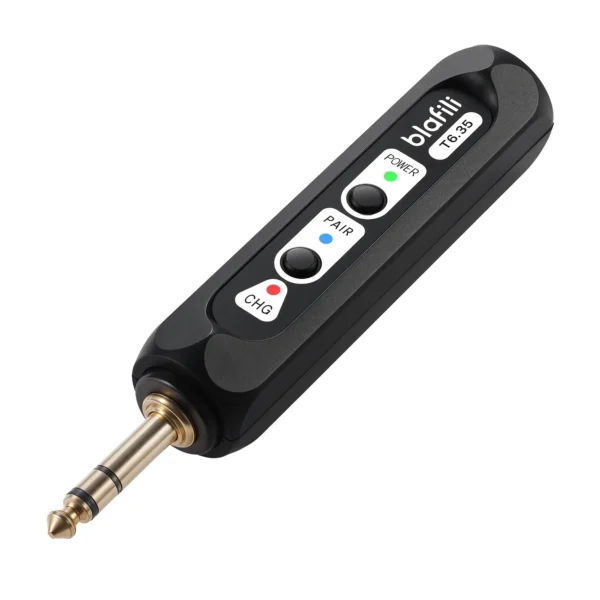
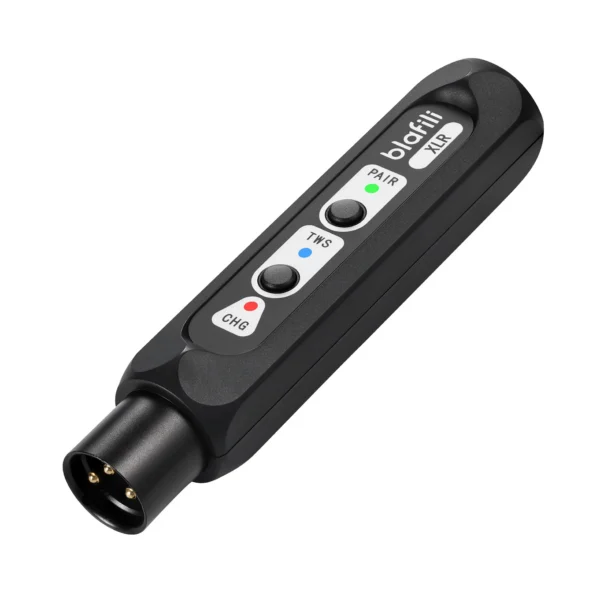
Which output to choose is a commitment question rather than a technical one. The master output carries everything including the last-minute fader ride; a booth or record output usually ignores the master fader, which protects the wireless feed from your own last-second adjustments but also means the speakers do not follow the fade at the end of the night. Professional setups that rely on the wireless link all night pick the master path through a proper DI, while casual setups take the booth out and accept the trade. Output hardware differs across mixers, too: RCA pairs are the common consumer connector, 1/4-inch TRS jacks dominate the pro compact format, and larger installations carry balanced XLR, so the transmitter input you buy is decided by the back panel in front of you. The T6.35's 1/4-inch TRS plus RCA input covers the first two without adapters, and a balanced-output receiver such as the XLR model serves the receiving end of long runs where noise rejection matters.
Two zones from one booth
Dual-link transmission turns one mixer output into two wireless zones, and ceremonies are the use case that made it standard kit. The main speaker pair covers the room while a second receiver feeds a hallway or patio speaker, and both zones hear the same mix with no extra cabling. The trade-off is the familiar headroom one: two links share the radio, so the negotiated codec often steps down a tier, and both receivers should support the same codec set so one zone does not drop to SBC while the other runs aptX. Placement matters as much as the codec, because a transmitter squeezed behind a rack of gear loses range to metal before the spec sheet says it should, and a clear line of sight from the booth to each zone is worth more than any antenna claim.
The inbound direction: phones and requests
The reverse path answers the modern crowd question: someone wants their song played, and their song lives on their phone. A Bluetooth receiver plugged into a spare line input, an AUX return or an unused channel gives the phone a wired-quality entry point at line level. The phone stays in your hand for track selection while the mixer's channel EQ and fader do the gain staging. This is the same receiving role a vintage amplifier plays in home setups, where a turntable-style receiver chain feeds a spare line input, and the input that suits it here is any line input the mixer already has, because consumer Bluetooth receivers output consumer line level.
Level discipline matters more on the inbound path than anywhere else in this guide. Bluetooth receivers differ in output level, so the channel gain needs a fresh setting the first time each receiver joins, and a phone at maximum volume into a hot channel clips in exactly the range where wedding speeches live. Set the phone to a middle step, gain the channel so the meter sits healthy at speech level, and leave headroom for the tracks that were mastered loud. Receiver pairing memory is the other practical limit: most consumer receivers hold a handful of devices, and a night of guest phones can fill that memory, so clear the list before doors and pair only the devices you intend to serve. If the receiver belongs to the venue rather than to you, a quick photo of its pairing state before you touch anything makes putting it back effortless.
The cue path stays wired
The one place Bluetooth does not belong in a DJ chain is the headphone cue. Beatmatching by ear asks you to compare two tracks that are seconds apart and hear which one drifts; measured delays for standard codecs run from about 260 ms for SBC on a headphone bench to 369 ms for AAC in phone tests, and those numbers land between a quarter and four tenths of a second, an eternity when a mix rides on tight transitions. Wireless cueing also drops out at the worst moments, and a dropout during a blend sends you hunting for a sync button that should never have been needed. The delay mechanics behind those numbers are the same ones that make lip sync visible on video, which our delay troubleshooting guide covers device by device. Keep cue headphones on the wire, and treat the wireless half of the chain as a convenience for the audience side.
Codec choices for the performance chain
Where the wireless link does carry the show, codec choice decides how tight the chain feels. Qualcomm's aptX Adaptive carries a low system latency target near 80 ms, and aptX Low Latency holds an approximately 40 ms design target, both requiring support on the transmitter and the speaker side. Standard codecs behave like they do everywhere else: SBC around 308 ms and AAC around 369 ms in the SoundGuys phone series, with the RTINGS bench echoing the SBC figure on true wireless earbuds. The full tables live on our codec latency page. For background music between sets, the standard tiers are fine; for a ceremony where the first dance starts on a spoken cue, the low-latency tiers earn their support requirement. The checking habit is the same one the home guides teach: read the codec list on the speaker as well as the transmitter, because the link runs on the overlap of the two sets, and a speaker that lists only SBC turns an expensive low-latency transmitter into an ordinary one. When the plan involves video on a projector or screen alongside the mixer chain, the sync expectations get stricter, and our projector and TV guides carry that side of the trade.
A short venue checklist
A five-minute walk of the room before doors prevents most of the failures this page describes. Power first: count the outlets the chain needs and plan one strip rather than a daisy chain, which is also the first ground-loop defense. Radio second: look at where the venue's access points sit, because a speaker placed against a router will fight for the 2.4 GHz band all night. Placement third: speakers at ear height on stands beat speakers on the floor, and a transmitter with line of sight to both zones keeps the link short. Backup fourth: one RCA-to-3.5 mm cable in the bag turns a dead wireless link into a two-minute wired recovery, and the dance floor never learns there was a problem.
Ground loops and other small enemies
Wireless conversions add power supplies, and power supplies add hum paths. A hum that appears only when the transmitter or receiver is connected is a ground loop: two devices on different outlets finding a second path through the audio cable. The fixes run from free to cheap, one power strip for the whole chain, a DI box with a ground lift on long runs, or a line isolator between the mixer and the conversion box. Laptop chargers are the most common offenders on the inbound path, which is another argument for running the phone through a Bluetooth receiver on battery rather than a wired laptop connection.
The rest of the checklist is short. Charge everything before doors, because a transmitter that dies mid-set takes the dance floor with it. Label the cables, because the booth output and the record output look identical from behind. And if the venue's wireless speakers live on a Wi-Fi mesh, expect the 2.4 GHz band to be crowded, which pushes codec choice and transmitter placement toward whatever keeps the link short and line-of-sight. None of this changes the mixer's job: it stays the gain-staging and EQ heart of the chain, and the wireless gear hangs off its inputs and outputs like any other outboard box.
FAQ
Yes, through a transmitter on the mixer's output side. Take the booth, record or master output into the transmitter input, pair the speaker, and set levels so the mixer fader and the speaker gain each sit in a sensible range. The speaker hears whatever the output channel carries, so pick an output you are happy to commit to.
For the main output to a rented or borrowed speaker, yes, with a latency caveat covered below. For headphone cueing and beatmatching, no wireless link today is tight enough to trust: measured delays for standard codecs run in the hundreds of milliseconds, which is an eternity when two tracks are seconds apart.
aptX Adaptive or aptX Low Latency when both ends support them, because those tiers carry the lowest delay targets among common codecs, approximately 80 ms and 40 ms respectively per Qualcomm's documentation. SBC and AAC work for background music where sync does not matter.
Yes, with a dual-link transmitter on the output side: one link feeds the main speakers and the other feeds a second zone such as a hallway or patio. Both zones receive the same mix, the codec tier is shared across both links, and the zone volumes are set at the receiving speakers rather than at the mixer.
Ground loops, in most cases. Two devices plugged into different outlets share a path through the audio cable, and the fix is one power strip for the chain, a DI box with a ground lift, or a line isolator on the connection. Laptop power supplies are frequent offenders.
blafili T6.35 Bluetooth Transmitter
A 1/4-inch TRS plus RCA input matches the outputs mixers actually carry, and simultaneous transmission to two receivers covers two zones from one booth.
- Qualcomm aptX Adaptive codec page: low system latency approximately 80 ms; aptx.com/aptx-adaptive, accessed 2026-09-25
- Qualcomm aptX Low Latency codec page: approximately 40 ms end-to-end design target; aptx.com/aptx-low-latency, accessed 2026-09-25
- SoundGuys four-phone measurement series (SBC 308 / aptX 316 / LDAC 324 / AAC 369 ms averages) and RTINGS headphone bench (SBC about 260 ms across true wireless earbuds), as verified for the codec latency page, accessed 2026-09-25
- blafili published product specifications (T6.35: 1/4-inch TRS plus RCA input, simultaneous transmission to two devices; XLR receiver: balanced XLR output), per lab PROFILE caliber table, accessed 2026-09-25
- Ground loop diagnosis and treatment, per general pro-audio engineering references (DI box ground lift, line isolators); general guidance, accessed 2026-09-25